Visual Search for Materials: From Sample Photo to Catalogue Match
TL;DR: Visual search for materials retrieves catalogue candidates using visual characteristics such as texture, pattern and colour from an input image. Define the similarity task and categories. Appearance cannot prove material composition, dimensions or suitability for an installation.

Original AI-generated editorial illustration; it depicts a concept rather than a client deployment or product screenshot.
Introduction
A customer sends a surface photograph rather than a product code. Glare, perspective and camera colour settings complicate the search. A useful application suggests plausible catalogue candidates and makes the remaining verification clear. Visual similarity should never be presented as proof of technical suitability. Here is how to evaluate visual search for materials against that business need.
What Is visual search for materials?
Visual search for materials retrieves catalogue candidates using visual characteristics such as texture, pattern and colour from an input image.
Buyers may lack a product identifier. Photography changes apparent material characteristics. Similar products can have different specifications.
Appearance cannot prove material composition, dimensions or suitability for an installation. The scope should make this distinction clear before the team commits to a solution.
Technical context: OpenCV documents image processing, camera calibration and neural-network inference capabilities. OpenCV: Computer vision tutorials
Why visual search for materials Matters
- Buyers may lack a product identifier.
- Photography changes apparent material characteristics.
- Similar products can have different specifications.
How to Evaluate and Implement visual search for materials
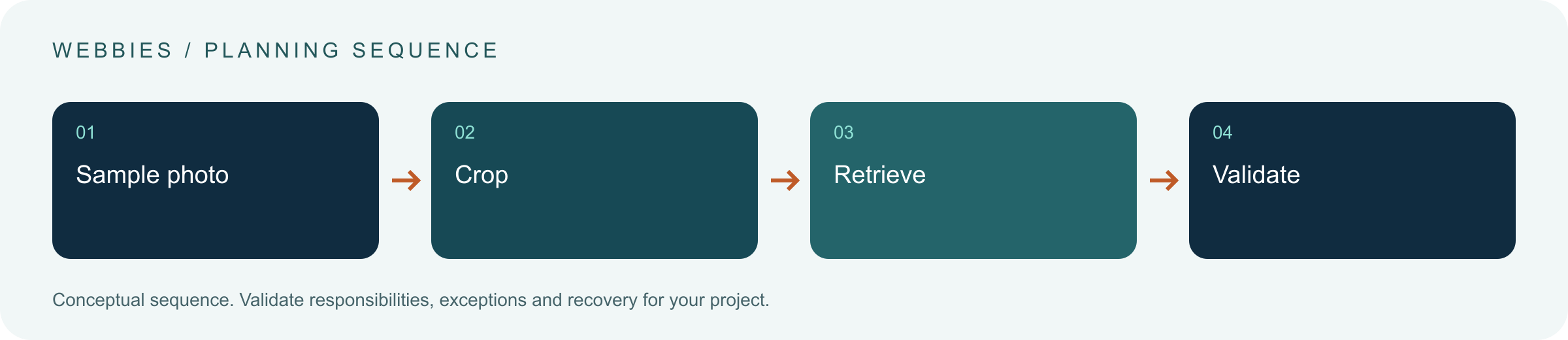
Build a searchable reference collection
Link approved product images to dimensions, category and finish metadata. Define whether the task is colour similarity, pattern similarity or likely identity. These require different evaluation criteria. Improve reference photography before assuming that retrieval needs a more sophisticated model. Keep retired products distinguishable so a visually good result does not lead to an unavailable selection.
Control the query image
Let users crop the relevant surface and exclude surrounding objects. Provide guidance for shadows, glare and distance. Request a second photograph when the image is insufficient. Do not turn a similarity score into a claim of exact identity. Evaluate photographs taken by field staff and customers, not just clean images already in the catalogue.
Finish with business validation
Combine visual candidates with filters for size, category and availability. Display product codes and a sample-request path. Record why staff accept or reject results. Distinguish missing catalogue coverage from a retrieval failure. A useful shortlist can speed discovery while leaving physical confirmation and technical suitability with the authorised product or sales team.
Compare the available approaches
| Approach | Suitable starting point | Main limitation or responsibility |
|---|---|---|
| Code search | Known identifier | Needs the code |
| Text search | Known description | Vocabulary varies |
| Visual search | Sample photo | Similarity needs validation |
A practical example
A hypothetical edgeband distributor retrieves candidates from sample photographs, then applies thickness and finish filters. A salesperson checks the shortlist and physical sample. The initial release supports one category, while other categories remain planned. This frames the feature as assisted discovery rather than a guarantee of exact matching across every material.
An acceptance test worth running
Search with a glare-heavy photograph, a cropped sample and an image of a material outside the catalogue. The results should distinguish plausible candidates from insufficient evidence. Apply a thickness filter and verify it uses metadata rather than visual inference. Ask a salesperson to record why a suggested result was rejected; that reason should be usable when improving the next evaluation set.
What to measure
Track useful shortlists, false exact-match claims, no-match handling and time to validated selection.
Use a representative baseline and record the conditions of the comparison. Agree who reviews failures and what evidence is needed before expanding the scope. For a broader view of the related delivery work, explore Webbies services.
Practical Steps for visual search for materials
- Define the similarity task and categories.
- Prepare reference images and metadata.
- Evaluate realistic photographs and no-match cases.
- Add filtering, samples and rejection feedback.
Prepare a useful project brief
| Decision | What to establish |
|---|---|
| Audience | material suppliers evaluating visual discovery |
| First boundary to agree | Define the similarity task and categories. |
| Evidence of useful performance | Track useful shortlists, false exact-match claims, no-match handling and time to validated selection. |
| Estimate dependency | Reference quality, query variation, catalogue coverage and review tools shape effort. |
Bring sample inputs and an example of an exception to the first discussion. Separate confirmed requirements from assumptions, and identify who can supply missing information. The brief should let a delivery team explain what it needs to investigate before making a detailed commitment.
Common Mistakes to Avoid
- Calling similarity an exact match.
- Ignoring missing catalogue coverage.
- Inferring dimensions from appearance.
Frequently Asked Questions
What does visual search for materials mean in a business project?
Visual search for materials retrieves catalogue candidates using visual characteristics such as texture, pattern and colour from an input image.
How should a team begin evaluating AI surface matching?
Define the similarity task and categories. Prepare reference images and metadata.
How do we measure whether image-based catalogue search is useful?
Track useful shortlists, false exact-match claims, no-match handling and time to validated selection.
What affects the cost or timeline of visual search for materials?
Reference quality, query variation, catalogue coverage and review tools shape effort. A delivery estimate should follow a review of these dependencies.
What is a common misconception about visual search for materials?
Appearance cannot prove material composition, dimensions or suitability for an installation.
Conclusion
Material search works best as assisted discovery backed by catalogue metadata. A shortlist can be valuable without claiming that appearance proves an exact product identity. Explore a material-search pilot with Webbies.
Sources and further reading
- OpenCV: Computer vision tutorials — primary technical reference, checked during research on 30 October 2026.
Discuss your project
Explore a material-search pilot. Share the current workflow, intended users, existing systems and the decision you need to make; the next step can be a 20–30 minute discovery discussion.