Shopify Custom App Development: When Your Store Needs Custom Logic
TL;DR: Shopify custom app development creates a tailored application or integration for a merchant's specific workflows using supported Shopify capabilities and APIs. Document the merchant-specific gap and difficult cases. A custom app is not automatically the best option; configuration or a suitable maintained app may solve the requirement.

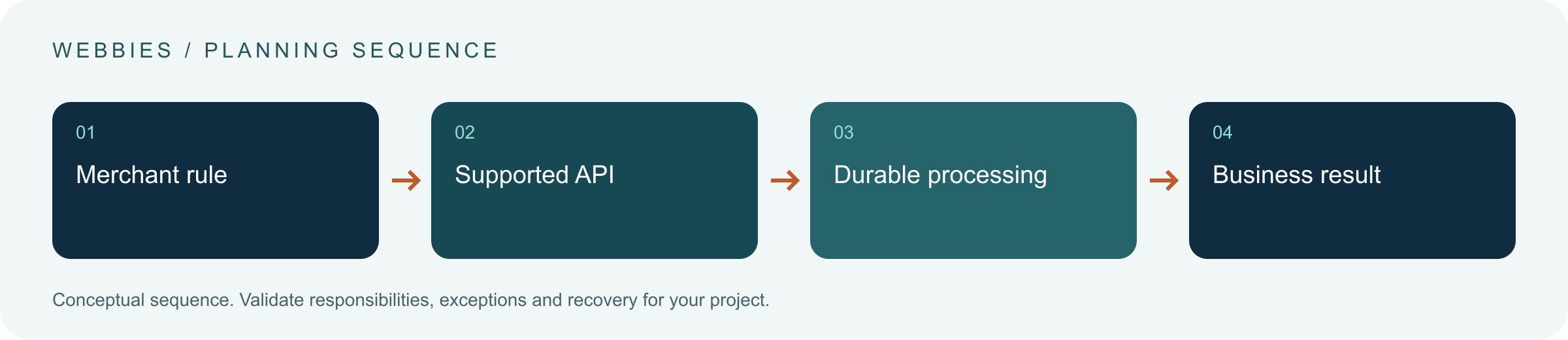
Original AI-generated editorial illustration; it depicts a concept rather than a client deployment or product screenshot.
Introduction
Installing another app can be useful, but a growing store may eventually need logic that spans its catalogue, operations and existing business systems. Custom development is justified by a specific gap. Start by checking what the platform and suitable maintained apps already support under the store's current plan and permissions. Here is how to evaluate Shopify custom app development against that business need.
What Is Shopify custom app development?
Shopify custom app development creates a tailored application or integration for a merchant's specific workflows using supported Shopify capabilities and APIs.
Custom rules can cross pricing, fulfilment and external systems. API access and feature eligibility need current verification. A custom app creates a maintenance obligation after launch.
A custom app is not automatically the best option; configuration or a suitable maintained app may solve the requirement. The scope should make this distinction clear before the team commits to a solution.
Technical context: Shopify describes webhooks as event notifications that can support synchronisation workflows. Shopify: About webhooks
Why Shopify custom app development Matters
- Custom rules can cross pricing, fulfilment and external systems.
- API access and feature eligibility need current verification.
- A custom app creates a maintenance obligation after launch.
How to Evaluate and Implement Shopify custom app development
Describe the gap before choosing an app architecture
Write the required outcome and the exception cases that current tools cannot handle. Compare platform configuration and suitable existing apps before commissioning code. A custom integration may be smaller than a full administrative app. Confirm supported extension points and data access for the intended distribution model. Avoid building around an assumed ability to change checkout or protected customer information without checking eligibility.
Plan events, APIs and business state
Use APIs for appropriate queries and commands, and webhooks for event-driven work where suitable. Validate event authenticity and design handlers to tolerate duplicate delivery. Queue longer work and preserve stable references for external transactions. An order-created notification is an input to a process, not a guarantee that the warehouse has accepted it. Maintain reconciliation for state that matters to fulfilment and finance.
Budget for platform change
Record the API version, dependencies and access scopes. Define how upgrades, permission changes and failures are handled. Keep merchant credentials and sensitive information outside user-visible logs. Test uninstall, reinstallation and loss of external-system access. A custom app should have an owner who can investigate why an event did not produce the expected business result, not merely a developer who can change its interface.
Compare the available approaches
| Approach | Suitable starting point | Main limitation or responsibility |
|---|---|---|
| Platform configuration | Supported standard behaviour | Limited to available features |
| Existing maintained app | Common merchant requirement | Vendor fit and dependency review |
| Custom app | Distinctive logic or integration | Engineering, operation and upgrades |
A practical example
A hypothetical retailer needs orders checked against an external product-compatibility service. Existing apps do not support the rule. A tailored app evaluates the relevant order data, records the result and routes exceptions for staff review. It does not silently alter an accepted purchase without the business's agreed process. The scope includes version maintenance and reconciliation rather than ending at the first successful API call.
An acceptance test worth running
Deliver a store event twice, temporarily remove external-system access and uninstall the app in a test environment. Check authentication, recovery and data-handling behaviour. Upgrade the supported API version in a controlled release and rerun the merchant's difficult cases. The app's support owner should be able to locate the business outcome from the originating event without guessing from interface activity.
What to measure
Measure correct workflow outcomes, failed events, duplicate prevention, upgrade readiness and staff correction effort.
Use a representative baseline and record the conditions of the comparison. Agree who reviews failures and what evidence is needed before expanding the scope. For a broader view of the related delivery work, explore Webbies services.
Practical Steps for Shopify custom app development
- Document the merchant-specific gap and difficult cases.
- Verify current APIs, scopes and feature eligibility.
- Build durable event handling and an exception route.
- Agree support, upgrade and reconciliation ownership.
Prepare a useful project brief
| Decision | What to establish |
|---|---|
| Audience | commerce owners evaluating a tailored Shopify capability |
| First boundary to agree | Document the merchant-specific gap and difficult cases. |
| Evidence of useful performance | Measure correct workflow outcomes, failed events, duplicate prevention, upgrade readiness and staff correction effort. |
| Estimate dependency | Workflow complexity, Shopify surfaces, external integrations and ongoing support requirements determine scope. |
Bring sample inputs and an example of an exception to the first discussion. Separate confirmed requirements from assumptions, and identify who can supply missing information. The brief should let a delivery team explain what it needs to investigate before making a detailed commitment.
Common Mistakes to Avoid
- Choosing custom development before checking supported features.
- Treating webhook delivery as exactly-once execution.
- Leaving API upgrades outside the maintenance plan.
Frequently Asked Questions
What does Shopify custom app development mean in a business project?
Shopify custom app development creates a tailored application or integration for a merchant's specific workflows using supported Shopify capabilities and APIs.
How should a team begin evaluating custom Shopify integration?
Document the merchant-specific gap and difficult cases. Verify current APIs, scopes and feature eligibility.
How do we measure whether Shopify app development for merchants is useful?
Measure correct workflow outcomes, failed events, duplicate prevention, upgrade readiness and staff correction effort.
What affects the cost or timeline of Shopify custom app development?
Workflow complexity, Shopify surfaces, external integrations and ongoing support requirements determine scope. A delivery estimate should follow a review of these dependencies.
What is a common misconception about Shopify custom app development?
A custom app is not automatically the best option; configuration or a suitable maintained app may solve the requirement.
Conclusion
Custom Shopify logic should solve a verified merchant gap through supported interfaces. Include event recovery and platform maintenance in the definition of the delivered application. Review a Shopify custom-app requirement with Webbies.
Sources and further reading
- Shopify: About webhooks — primary technical reference, checked during research on 30 October 2026.
Discuss your project
Review a Shopify custom-app requirement. Share the current workflow, intended users, existing systems and the decision you need to make; the next step can be a 20–30 minute discovery discussion.