Core Web Vitals: A Practical Performance Plan for Business Websites
TL;DR: Core Web Vitals are Google's user-experience metrics for loading performance, responsiveness and visual stability on the web. Choose important templates and customer devices. A perfect laboratory score is not proof that all real customers have a fast, usable experience.

Original AI-generated editorial illustration; it depicts a concept rather than a client deployment or product screenshot.
Introduction
A page can score well in a controlled test and still feel slow to customers using older phones or a variable connection. A performance plan needs real-user evidence and an understanding of the journey. Fix the parts delaying useful content or interaction rather than chasing an isolated score. Here is how to evaluate Core Web Vitals against that business need.
What Is Core Web Vitals?
Core Web Vitals are Google's user-experience metrics for loading performance, responsiveness and visual stability on the web.
Large imagery can delay the first useful view. Heavy scripts can make visible controls unresponsive. Layout movement can cause mistaken taps and reading disruption.
A perfect laboratory score is not proof that all real customers have a fast, usable experience. The scope should make this distinction clear before the team commits to a solution.
Technical context: Google's current Core Web Vitals cover loading, interactivity and visual stability. Google web.dev: Web Vitals
Why Core Web Vitals Matters
- Large imagery can delay the first useful view.
- Heavy scripts can make visible controls unresponsive.
- Layout movement can cause mistaken taps and reading disruption.
How to Evaluate and Implement Core Web Vitals
Understand what the metrics describe
Largest Contentful Paint describes loading of the main visible content; Interaction to Next Paint concerns responsiveness; Cumulative Layout Shift concerns unexpected movement. Read field evidence alongside lab diagnostics. Segment important page types and devices. A homepage result cannot represent a product visualiser or a long service page. Use the metrics to locate experience problems, then inspect the actual page behaviour that produced them.
Prioritise the critical journey
Identify the resource responsible for the main content, avoid unnecessarily delaying it and right-size images. Inspect third-party scripts and work that blocks interaction. Reserve space for images, embeds and dynamic content. Defer nonessential features carefully without hiding the main task. A business site should make its offer and next action usable before decorative effects consume scarce loading and processing capacity.
Build performance into maintenance
Set budgets for assets and scripts, and check representative templates during releases. Use lab tools to diagnose and field data to understand real conditions. Avoid a one-time optimisation exercise followed by uncontrolled additions. Monitor the user task as well as metric trends: a fast but broken enquiry form is not a good experience. Assign a person who can challenge new dependencies that materially affect responsiveness.
Compare the available approaches
| Approach | Suitable starting point | Main limitation or responsibility |
|---|---|---|
| Lab measurement | Controlled diagnosis | Limited representation of real traffic |
| Field measurement | Observed user conditions | Needs enough representative data |
| Task testing | Whether customers can finish | Does not replace performance measurement |
A practical example
A hypothetical building-products website loads a large hero video before useful text. The team tests a lighter first view, reserves image dimensions and delays nonessential scripts. It then checks real-device interaction and enquiry completion. The changes are evaluated using observed performance rather than a promised search-ranking or conversion improvement.
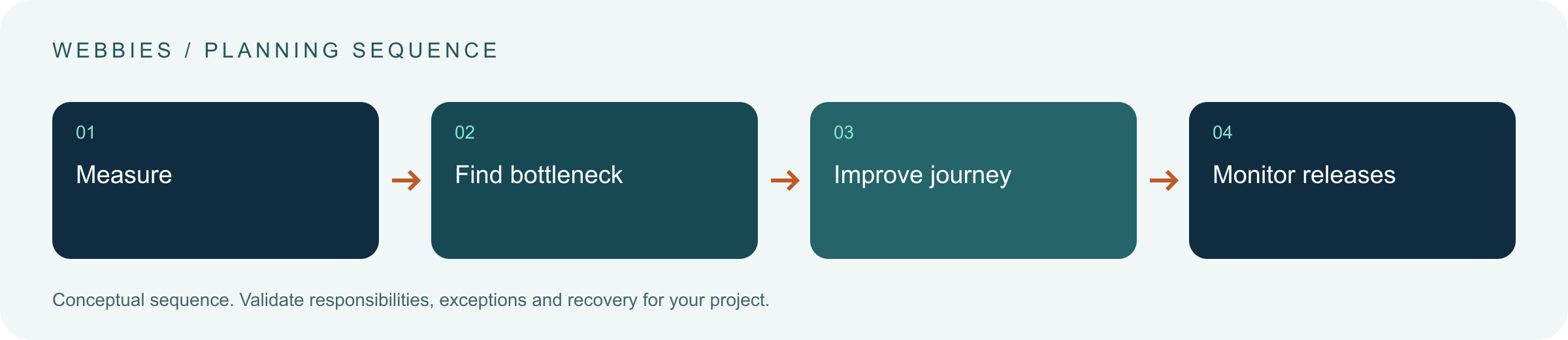
An acceptance test worth running
Measure a representative product or service page on a common customer phone and variable connection. Interact while large content and third-party scripts load. Record the bottleneck, make a targeted change and compare the same conditions. Check field evidence over an appropriate period. Keep the enquiry or purchasing task in the review so metric improvement does not conceal broken functionality.
What to measure
Assess LCP, INP and CLS for representative users alongside task completion and regressions.
Use a representative baseline and record the conditions of the comparison. Agree who reviews failures and what evidence is needed before expanding the scope. For a broader view of the related delivery work, explore Webbies services.
Practical Steps for Core Web Vitals
- Choose important templates and customer devices.
- Compare field evidence with lab diagnostics.
- Fix the largest loading, interaction and stability causes.
- Set release budgets and monitor the resulting experience.
Prepare a useful project brief
| Decision | What to establish |
|---|---|
| Audience | business website owners and product teams |
| First boundary to agree | Choose important templates and customer devices. |
| Evidence of useful performance | Assess LCP, INP and CLS for representative users alongside task completion and regressions. |
| Estimate dependency | Asset size, rendering architecture, third-party scripts and template variation determine optimisation scope. |
Bring sample inputs and an example of an exception to the first discussion. Separate confirmed requirements from assumptions, and identify who can supply missing information. The brief should let a delivery team explain what it needs to investigate before making a detailed commitment.
Common Mistakes to Avoid
- Treating one desktop score as the whole site.
- Adding scripts without checking interaction cost.
- Assuming speed guarantees rankings.
Frequently Asked Questions
What does Core Web Vitals mean in a business project?
Core Web Vitals are Google's user-experience metrics for loading performance, responsiveness and visual stability on the web.
How should a team begin evaluating website performance optimization?
Choose important templates and customer devices. Compare field evidence with lab diagnostics.
How do we measure whether LCP INP CLS is useful?
Assess LCP, INP and CLS for representative users alongside task completion and regressions.
What affects the cost or timeline of Core Web Vitals?
Asset size, rendering architecture, third-party scripts and template variation determine optimisation scope. A delivery estimate should follow a review of these dependencies.
What is a common misconception about Core Web Vitals?
A perfect laboratory score is not proof that all real customers have a fast, usable experience.
Conclusion
Performance work should make the important journey feel faster and more stable for actual customers. Use field evidence, targeted diagnosis and release discipline together. Assess website performance in real use with Webbies.
Sources and further reading
- Google web.dev: Web Vitals — primary technical reference, checked during research on 30 October 2026.
Discuss your project
Assess website performance in real use. Share the current workflow, intended users, existing systems and the decision you need to make; the next step can be a 20–30 minute discovery discussion.